


Salesforce Health Cloud provides comprehensive features for managing patient appointments and schedules. With Salesforce Health Cloud appointment scheduling, every patient has a profile that includes their demographic information, medical history, and appointment details. Users can schedule appointments directly within Health Cloud, specifying details such as date, time, location, provider, and reason for the appointment. Health Cloud also enables providers to set their availability, ensuring appointments are made only when they are available to see patients.
Problem Statement :
Healthcare organizations often face challenges when it comes to managing patient appointments. In traditional systems, patients had to make phone calls or visit the hospital directly to schedule appointments, which placed a heavy burden on provider staff and practitioners. This manual process led to several issues, including long wait times, appointment conflicts, and poor patient experience.
Key Challenges :
- Manual Scheduling : Appointment scheduling was mostly done over the phone, causing long wait times and a high potential for errors.
- Appointment Conflicts : Multiple clinics and providers led to scheduling conflicts, with overlapping appointments and unavailable providers.
- Poor Patient Experience : Patients struggled to find available appointment slots and had limited visibility into their upcoming appointments.
Appointment Scheduling Management :
Salesforce Health Cloud offers a solution to these challenges by centralizing patient data and providing a 360-degree view of patient information, making appointment scheduling more efficient and streamlined.
Salesforce Health Cloud Implementation :
- Centralized Patient Data : Implemented Salesforce Health Cloud to consolidate all patient information, allowing healthcare providers to have a comprehensive view of each patient’s history.
- EHR Integration : Integrated seamlessly with existing Electronic Health Record (EHR) systems to facilitate smooth data exchange.
Appointment Scheduling Automation :
- Intelligent Appointment Management: Leveraged Salesforce’s Intelligent Appointment Management feature to automate the scheduling process.
- Rules-Based Scheduling: Used rules-based scheduling to match patients with the right provider and clinic, taking into account their preferences, availability, and medical needs.
- Patient Portal and Mobile App: Enabled patients to book appointments online through a portal or mobile app, significantly reducing the reliance on phone calls.
Real-Time Availability and Reminders :
- Calendar Integration: Integrated clinic calendars to provide real-time availability, ensuring that patients can book appointments based on up-to-date schedules.
- Automated Reminders: Automated appointment reminders were sent via email and SMS, reducing no-show rates and ensuring better adherence to appointments.
Waitlist Management :
- Automated Waitlist : A waitlist feature was added to notify patients automatically of available slots in case of cancellations or rescheduled appointments.
Personalized Patient Experience :
- Customized Communication : Personalized appointment reminders and notifications based on the type of appointment and patient preferences.
- Self-Service Options : Allowed patients to reschedule or cancel appointments online, giving them more flexibility and control over their healthcare journey.
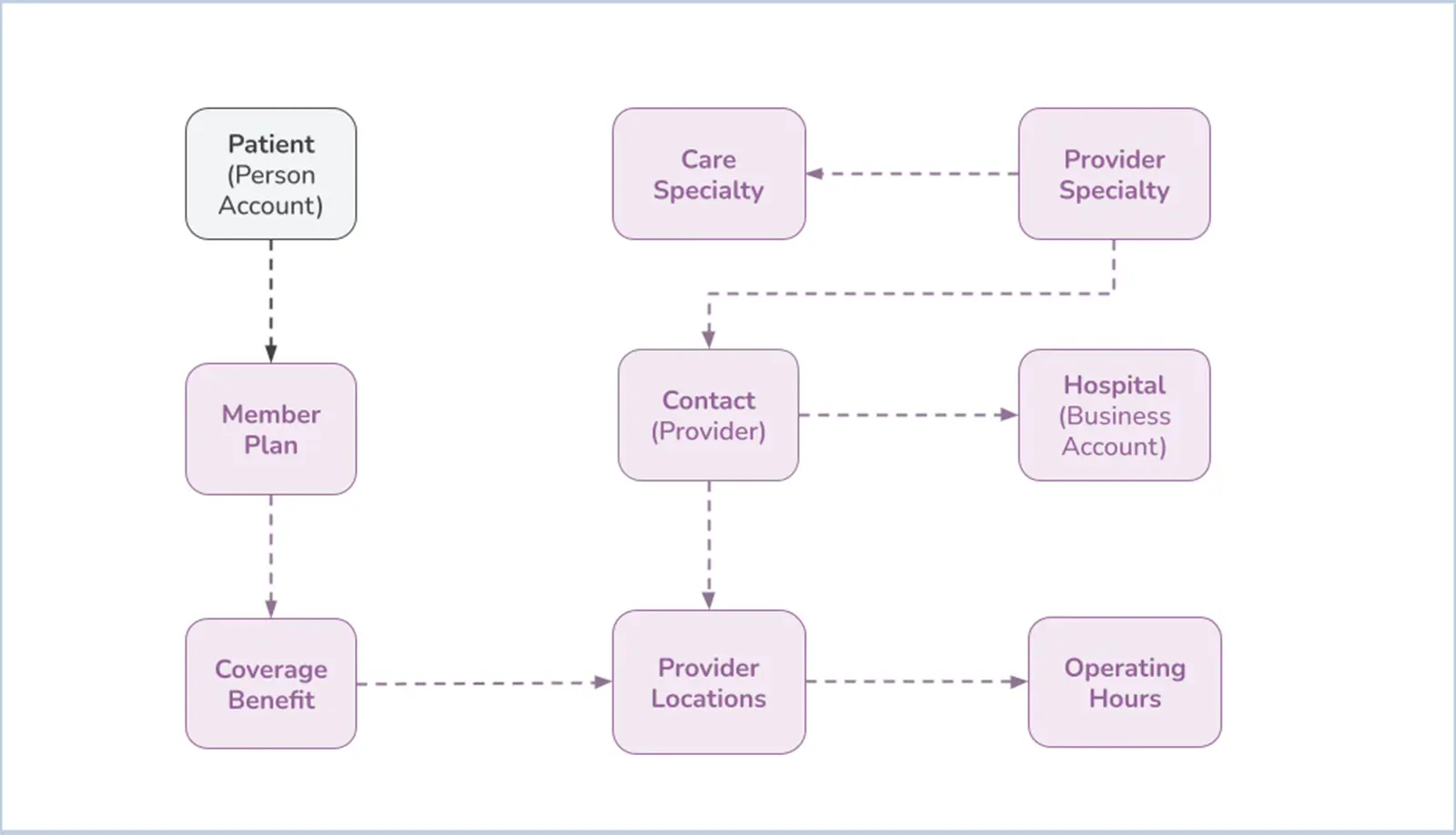
Data Model :
Individual Appointments :
To book an appointment with a practitioner for the member (patient) alone, the system has been customized to gather the required specialty type of the practitioner from the patient. Based on the practitioner’s location and availability, the member can book the appointment at their convenience.
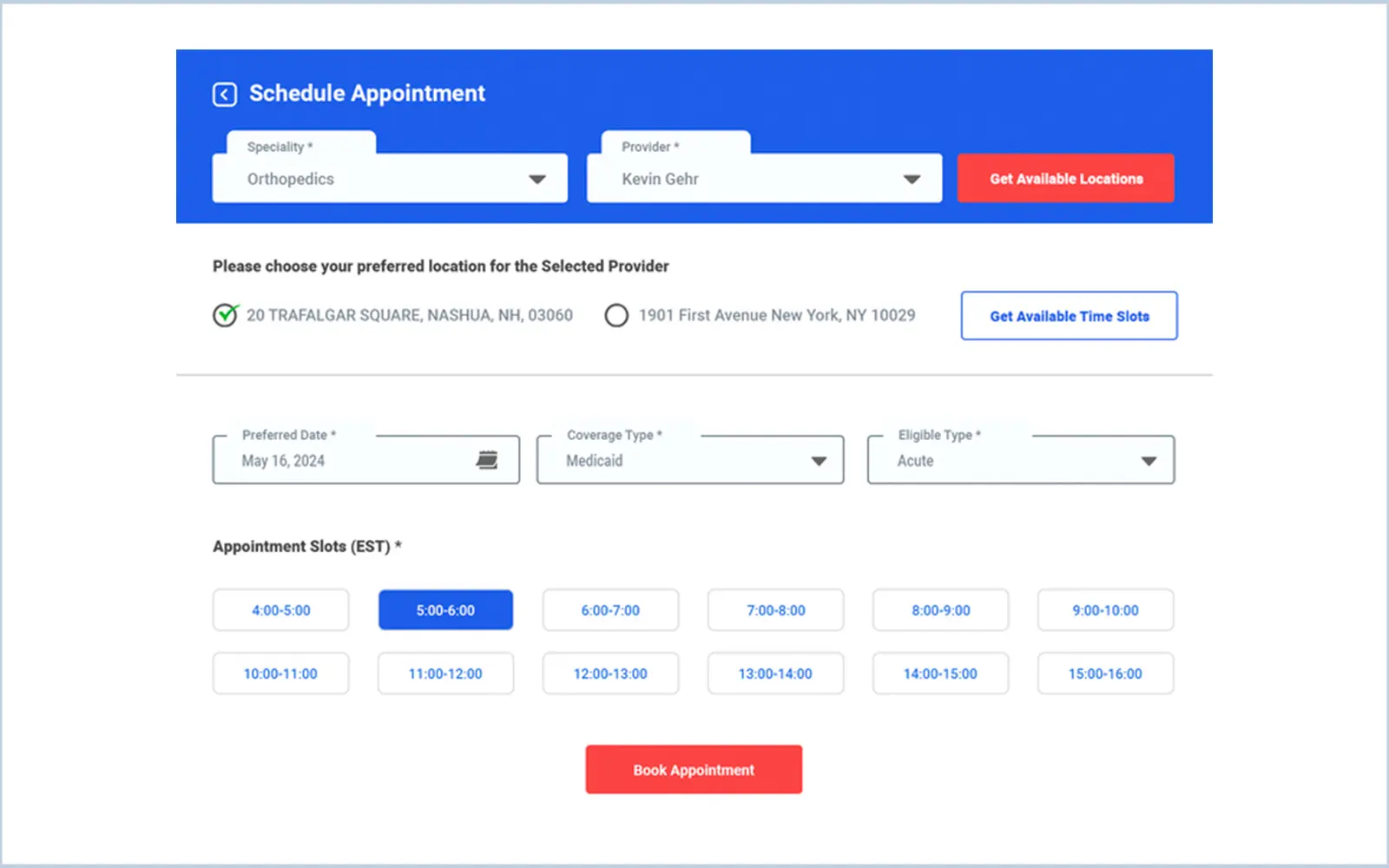
For booking an appointment with a practitioner on a specific date, the system collects certain information from the patient :
- Specialty Selection : The member selects the specialty for their appointment. Based on this specialty, a list of available practitioners is displayed.
- Practitioner Selection : The member chooses a practitioner from the provided list.
- Location Selection : The system displays the available locations of the selected practitioner. The member selects their preferred location.
- Preferred Date : The member provides their preferred date for the appointment and specifies the coverage type.
- Time Slot Selection : Based on the provided date, the system displays the available time slots for the selected practitioner. The member chooses their preferred time slot.
- Appointment Type : The system displays the available appointment eligibility types for the selected time slot, and the patient selects the type of appointment.
After providing all these details, the system creates a service appointment for the member with the selected practitioner on the given date and time. This appointment is tracked and notified until it is completed.
Additionally, the system offers a feature to cancel the appointment based on the request of either the member or the practitioner.
Snapshot :
Group Appointments :
To book an appointment with a practitioner for the member (patient) along with their family members, the system has been customized to gather the required specialty type of the practitioner from the patient. Based on the practitioner’s location and availability, the member can book the appointment at their convenience.
For booking an appointment with a practitioner on a specific date, the system collects certain information from the patient :
- Member Selection : From the Family member list, the member chooses the required number of family members for the appointment.
- Specialty Selection : The member selects the specialty for their appointment. Based on this specialty, a list of available practitioners is displayed.
- Practitioner Selection : The member chooses a practitioner from the provided list.
- Location Selection : The system displays the available locations of the selected practitioner. The member selects their preferred location.
- Preferred Date : The member provides their preferred date for the appointment and specifies the coverage type.
- Time Slot Selection : Based on the provided date, the system displays the available time slots for the selected practitioner. The member chooses their preferred time slot.
- Appointment Type : The system displays the available appointment eligibility types for the selected time slot, and the patient selects the type of appointment.
After providing all these details, the system creates a service appointment for the member along with their family members with the selected practitioner on the given date and time. This appointment is tracked and notified until it is completed.
Additionally, the system offers a feature to cancel the appointment based on the request of either the member or the practitioner.
Recurring Appointments :
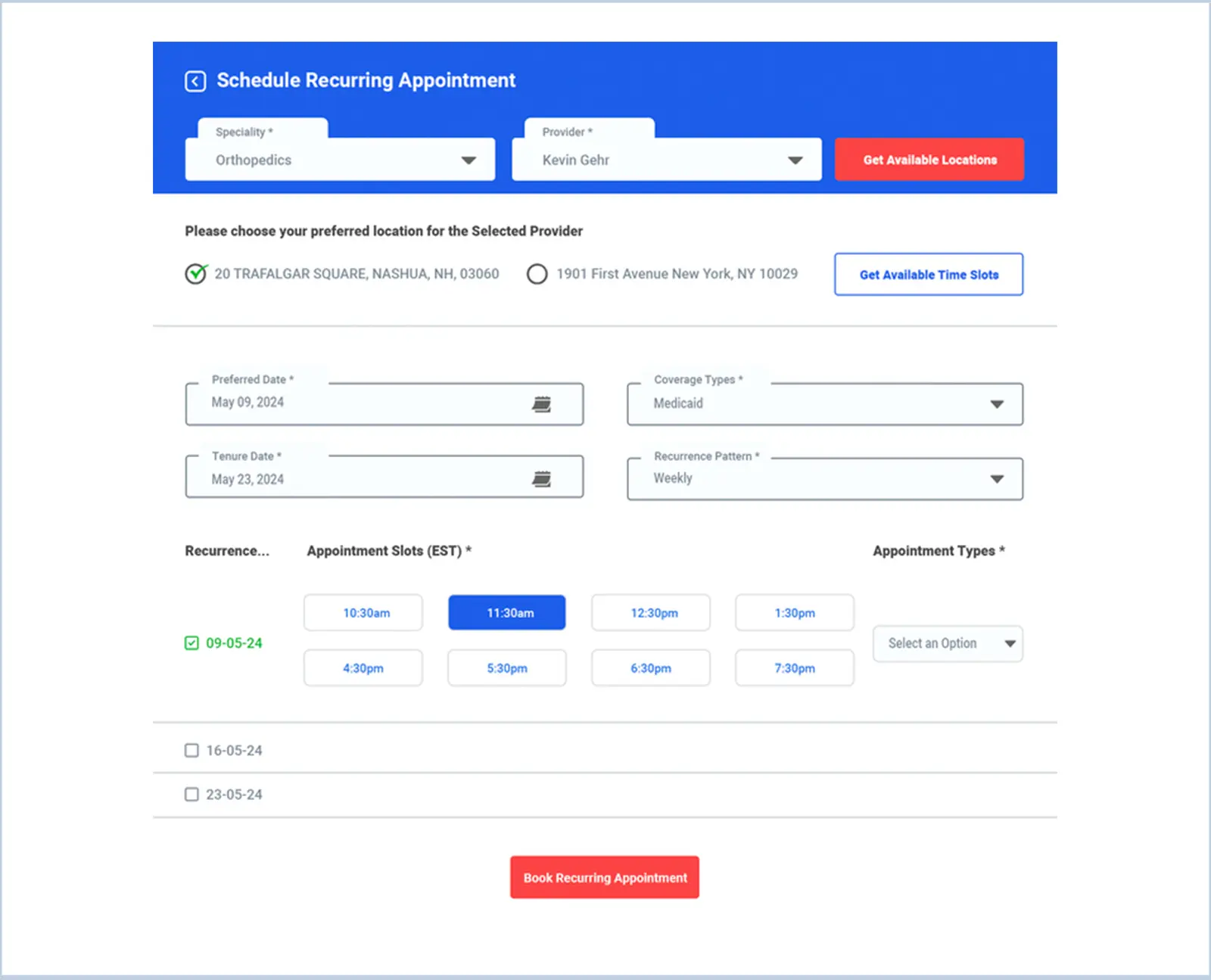
To book recurring appointments for an individual member based on their preferred date, tenure, and recurring intervals, the system follows these steps :
- Specialty Selection : The member selects the specialty for their appointment. Based on this selection, a list of available practitioners is displayed.
- Practitioner Selection : The member chooses a practitioner from the list.
- Location Selection : The system shows the available locations for the selected practitioner. The member selects their preferred location.
- Preferred Date and Tenure : The member provides their preferred start date for the appointments and specifies the tenure duration.
- Recurrence Pattern : The member selects the recurrence pattern for the appointments (e.g., weekly, bi-weekly, monthly, annual, semi-annual, quarterly).
- Coverage Type : The member specifies the coverage type.
- Time Slot Selection : Based on the provided dates and recurrence pattern, the system displays the available time slots for each date within the intervals. The member chooses their preferred time slot for each date.
- Appointment Type : The system shows the available appointment eligibility types for the selected time slots. The member selects the type of appointment for each date.
After providing these details, the system creates a series of service appointments for the member with the selected practitioner on the specified dates and times. Each appointment is tracked and notifications are sent until all appointments are completed.
Additionally, the system offers a feature to cancel any appointment based on the request of either the member or the practitioner.
Snapshot :